Ebook Info
- Published: 2009
- Number of pages: 368 pages
- Format: PDF
- File Size: 10.32 MB
- Authors: Faithe Wempen
Description
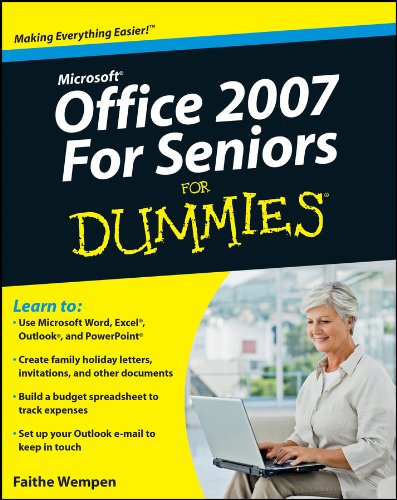
Seniors who are new to computers can learn Office applications quickly and easilyIf you’re over 50 and new to computers, everything about them can seem intimidating. The most common applications you’ll want to use are part of the Microsoft Office suite – Word, Excel, PowerPoint, and Outlook. Microsoft Office 2007 For Seniors For Dummies shows you how to use each one in a straightforward, fun manner that takes all the apprehension away.This plain-English guide shows you just what you need to know to write letters with Word, keep a budget with an Excel spreadsheet, create fun slideshows with PowerPoint, and set up an e-mail account using Outlook. Microsoft Office 2007 For Seniors For Dummies doesn’t assume you were born knowing how to use a computer; it starts at the beginning and makes learning easy and quick.Each chapter lists the tasks covered, with page references to help you locate what you needShows how to start each application and navigate the elements on the screenCovers how to create documents in Word and provides templates for letters and faxesExplains how to create spreadsheets and includes a grid for budgetingGuides you through creating a PowerPoint presentationDemonstrates how to set up an e-mail account with Outlook and communicate with othersMicrosoft Office 2007 For Seniors For Dummies will have you using basic Office applications in no time, and boost your confidence too.
User’s Reviews
Editorial Reviews: From the Inside Flap Office isn’t just for the office! Use it for letters, budgets, e-mail, and presentationsNow that you’ve got the hang of a PC, you want to be able to do real-life tasks with it. Enter Microsoft Office, the world’s most popular suite of applications! It lets you write family newsletters, track your bank balances and plan budgets, create presentations for your club or group, and send and receive e-mail. This handy guide makes it easy!Some things stay the same — get to know the Ribbon and commands that Office applications shareMake it pretty — apply styles and formatting to your Word documents, and include clip art, photos, and background colorFigure it out — calculate interest earned, loan payments, amortization, and more using Excel spreadsheetsMail call — set up your Outlook e-mail and learn to avoid fraud, scams, and virusesGet organized — manage contacts, to-do lists, and calendars with OutlookMake your point — learn your way around PowerPoint and how to create slideshows with photos, animation, and soundBetter records — keep address lists and other important information in an Excel databaseSaving and sharing — save documents, e-mail them to others, print them, or share them onlineOpen the book and find:How to start and navigate the Office applicationsA guide to the Ribbon, the Office menu, and other all-new tools for 2007Ways to dress up documentsHow to create invitations or newsletters with photosUses for simple spreadsheetsAdvice on setting up e-mailWhat you can do with a slideshowHow to do a mail merge and print documents From the Back Cover Office isn’t just for the office! Use it for letters, budgets, e-mail, and presentationsNow that you’ve got the hang of a PC, you want to be able to do real-life tasks with it. Enter Microsoft Office, the world’s most popular suite of applications! It lets you write family newsletters, track your bank balances and plan budgets, create presentations for your club or group, and send and receive e-mail. This handy guide makes it easy!Some things stay the same ― get to know the Ribbon and commands that Office applications shareMake it pretty ― apply styles and formatting to your Word documents, and include clip art, photos, and background colorFigure it out ― calculate interest earned, loan payments, amortization, and more using Excel spreadsheetsMail call ― set up your Outlook e-mail and learn to avoid fraud, scams, and virusesGet organized ― manage contacts, to-do lists, and calendars with OutlookMake your point ― learn your way around PowerPoint and how to create slideshows with photos, animation, and soundBetter records ― keep address lists and other important information in an Excel databaseSaving and sharing ― save documents, e-mail them to others, print them, or share them onlineOpen the book and find:How to start and navigate the Office applicationsA guide to the Ribbon, the Office menu, and other all-new tools for 2007Ways to dress up documentsHow to create invitations or newsletters with photosUses for simple spreadsheetsAdvice on setting up e-mailWhat you can do with a slideshowHow to do a mail merge and print documents About the Author Faithe Wempen teaches computer classes at Indiana University-Purdue University at Indianapolis. She is the author of PowerPoint 2007 Bible and Office 2007 Bible, and has trained over a quarter of a million students in Office applications through her online courses for Powered.com. Read more
Reviews from Amazon users which were colected at the time this book was published on the website:
⭐I downloaded several book samples for Office 2007 prior to buying this one. I wanted to have this on my Kindle for PC so that I could refer to it while using MS Office.The other books I sampled had graphics that were small and difficult to read in their electronic versions. And the pictures can’t be zoomed, either, though of course the text can be.I finally decided to download this sample because I thought, “Hmmm… for SENIORS they might have bigger, clearer pictures!” And that is indeed the case. The other books might be fine in their hardcopy versions, but not electronically in my opinion. “Office 2007 for Seniors for Dummies” really fits the bill for a book that of necessity rely heavily on pictures/graphics.
⭐I bought this for my Mother and she was rather insulted by the simplicity of the book. She isn’t what I would call a total techie but she understands most of what this book covers. She did learn a few helpful tips. I thought it had many helpful tips and tricks. i think this would be helpful for someone who is just beginning with computers, young and seniors alike. The format was just alright. I would save your money and find a different book for the money!
⭐Nice and simple. I began by starting it like a text book but it quickly became a reference manual. It’s works for me. Thanks.
⭐I was having problems with the new/old version of microsoft word. I have used Microsoft Word for over 20 years and I kept buying each new version when it came out after about 6 months. Well when it came to 2007 I wasn’t able to get to know all the new methods so I went back to the 2003 version. Until September when my 2003 version got corrupted I was happy with Word. So I HAD to go to the 2007 version and it has been hard to navigate my way through the 2007 version. So I bought the Office 2007 For Seniors Dummies book. I have been reading and then doing the subject that was in each section.It is helping me a little bit but then I haven’t gotten through the book yet!Den
⭐Although I haven’t gotten into this manual as I should I can certainly see that it is a quality manual and will be very helpful to me in learning 2007, especially Outlook. You cannot beat the price as well, thanks for reading.
⭐every computer challenged senior should start with this book for a better understanding of computers. it is wonderful to be able to communicate with the world via my computer.
⭐A great guide for someone who has not used Office before. Very easy to follow and written in simple terms. I haven’t had a chance to do much yet with excel or powerpoint;but just what I have thumbed through leaves me with no doubt that they to are also easy to follow.
⭐got it
⭐It seems that as part of my family responsibilities I have to provide IT support to my wife, father in law and brother in law. All pretty funny as I have no training myself, but just have a good memory for what worked in the past coupled with a willingness to just press buttons until software does what I want it to.I got this for my father in law as a first port of call reference manual and to support him on his own training. Looking at it myself I found it easy to navigate to find what I wanted, and while mainly confirming what I have learnt through trial and error did add some new options to my knowledge.Since handing it over I have received less calls for help and been given indications that this does the job and has been well received.For anybody out there needing assistence, this will do the job and is a lot cheaper than calling for help and a lot easier than taking loads of notes. For those more experienced, it could make a handy reference manual but as the web generally provides in that area, not a neccessary one.For people like me who help others but want to minmise the activity, it’s a perfect gift for the person you support, although it will just leave you with the difficult problems to solve.
⭐Microsoft Office 2007 for Seniors For Dummies (For Dummies (Computers))
⭐In one review of this book, it was described as ‘patronising’ I did not find this at all. It has very easy to understand explainations. The only problem can be, that some of the information is for Microsoft Vista, which I do not have. At 77 years of age, any help is welcome and this is a good one!
⭐Exactly what I was looking for. Good condition
⭐am very happy with this book clear instructions most helpful
⭐Being in my early 60’s, I am a computer numpty and have found this book so far to be very useful.
Keywords
Free Download Microsoft Office 2007 For Seniors For Dummies 1st Edition in PDF format
Microsoft Office 2007 For Seniors For Dummies 1st Edition PDF Free Download
Download Microsoft Office 2007 For Seniors For Dummies 1st Edition 2009 PDF Free
Microsoft Office 2007 For Seniors For Dummies 1st Edition 2009 PDF Free Download
Download Microsoft Office 2007 For Seniors For Dummies 1st Edition PDF
Free Download Ebook Microsoft Office 2007 For Seniors For Dummies 1st Edition