Ebook Info
- Published: 2013
- Number of pages: 408 pages
- Format: PDF
- File Size: 6.18 MB
- Authors: John Walkenbach
Description
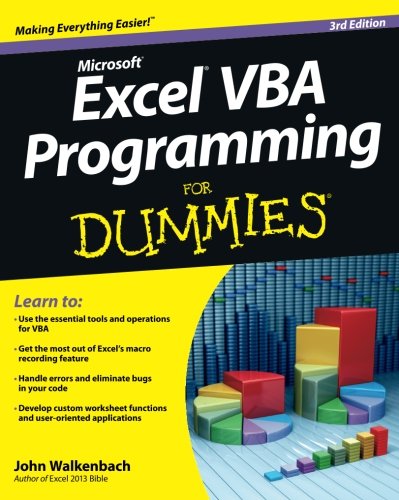
Take control of your spreadsheets and use VBA to create your own custom Excel applicationsAuthor and Excel guru John Walkenbach, known to his devoted fans as “Mr. Spreadsheet,” guides you through taking your Excel skills to the next level by creating your own customized spreadsheet solutions using Visual Basic for Applications (VBA). This updated edition of this bestselling book shows you how to use VBA, write macros, customize your Excel apps to look and work the way you want, avoid errors, and more.Introduces you to a wide array of new Excel 2013 options, beginning with the most important tools and operations for the Visual Basic EditorProvides an overview of the essential elements and concepts for programming with Excel, including using VBA to customize your applications and automate functionsShares techniques for handling errors, debugging, working with range objects, controlling flow, and much moreZeroes in on creating custom dialog boxes, toolbars, and menusAdd a personal touch to your spreadsheets and present your data the way you want with Excel VBA Programming For Dummies, 3rd Edition.
User’s Reviews
Editorial Reviews: From the Back Cover Learn to:Use the essential tools and operations for VBAGet the most out of Excel’s macro recording featureHandle errors and eliminate bugs in your codeDevelop custom worksheet functions and user-oriented applicationsExplore VBA programming and learn how to customize and automate many aspects of ExcelMaybe you’re eager to learn Excel programming. Maybe it’s your boss’s idea. Either way, this book will have you on your way to Excel programming perfection in no time! It’s a plain-English guide to what VBA is, how it works with Excel, essential programming concepts, and steps to creating some very cool dialog boxes, time-saving macros, Excel add-ins, and more.VBA-speak — learn the language of VBA and steps for creating a program in ExcelMacro magic — automate common tasks, create custom buttons and commands, and develop new worksheet functions using VBA macrosProgramming basics — work with range objects, control program flow, automate procedures and events, and exterminate bugs in your codeUser communication — explore simple and custom dialog boxes and UserForm controls, tricks, and techniquesAll together now — apply your skills to design user-oriented applications, create add-ins, and work with other Office applicationsOpen the book and find:Some Excel history that’s good to knowAll about VBA sub and function proceduresHow you can get ahead by learning VBAThe difference between programming errors and runtime errorsTips for finding and fixing bugsHow to customize Excel’s user interfaceWays to super-charge your formulas with custom worksheet functionsVBA dos and don’ts About the Author John Walkenbach, known to his fans as Mr. Spreadsheet, has written some 50 books and around 300 articles on computer topics, predominantly Excel. He created the award-winning Power Utility Pak and several other versatile Excel add-ons. John maintains the Spreadsheet Page at http://spreadsheetpage.com.
Reviews from Amazon users which were colected at the time this book was published on the website:
⭐I needed to learn VBA quickly! This book was exactly what I needed. I have programming experience so this primer was perfect. Even if you don’t have any programming experience, reading this book will most definitely give you what you need to get started. It provides a good foundation and understanding of VBA so you can move on to further hone your skills. Oh, and there are a lot of code examples in the book and on the companion web site.
⭐As most books in the “Dummies” series, the book is appropriate for a complete novice at VBA like me. While I am a proponent of injecting humor in technical books – I teach electrical engineering courses and would like to have some appropriate humor in some of those really dry textbooks – the author does devolve from humor to silliness at times, which distracts from the point he’s trying to make. Overall, though, the book can fly a “mission accomplished” banner without hesitation. I would have no problem purchasing more books from this author.
⭐As a professional VBA developer I can tell you that this book is what I recommend anyone who is a non-programmer wanting to learn Excel VBA to improve their productivity. It is fantastic. I have taught sales guys to use this to generate simple Excel VBA demos and tools for improving their own productivity.
⭐Not much here. Okay to get your feet wet. If you want to realy become a VBA programmer, get the real book “Excel 2013 Power Programming with VBA” by the same author. It is a 3 times larger volume and contains 3 times a much information for just a few dollars more.
⭐Well written and acessible. I have been banging out VBA for work for the last few months. This book filled in many gaps in my knowledge and tied everything together quite well. The section on ChartObjects was especially illuminating.
⭐This book is very easy to understand … I am about a 1/3 of the way through. I wanted a book for beginners, so this worked. I plan to get another book that is more advanced when I am finished with this one so I can continue to learn.
⭐The book is right for me. Enough detail, but not paced too fast. I didn’t get everything I needed from it because I’m trying to do something a bit unusual. The material covered is covered well, but my project is a little weird. I learned enough to be able to interpret the little I could find about it on the web, and all in all, I’m satisfied. I’m not finished with it yet, so it may well be that the information I”m looking for is still there to find!
⭐This book strikes the perfect balance between simplicity and usefulness. Many books aimed at novice programmers simplify the material so much it leaves the reader with a general idea but few practical skills. Mr. Walkenbach did an admirable job in this work providing usable examples and explanations that can be applied in real life situations.
⭐NOTE – Added 03.01.2017 – I wrote this review for the 3rd edition of this book, but have since noticed that Amazon also lists it when you view reviews for the 4th edition, I cannot comment on the 4th edition as I have not read it!To put my review into a meaningful context, I will say now that I have been programming for 2-3 years. The thing with this book though, is that almost nowhere within it did I encounter any terminology I would have found intimidating as a beginner. I had wanted to program VBA as it is enormously useful and this book was exactly what I was after.The author begins by stating the strengths of Excel VBA and also it’s history which is interesting enough. He then goes on to talk about the way that VBA programs are structured (if, for, while statements etc.) and how to write handy subroutines and functions. All the while the code is kept to small examples between 5-20 lines and I found that I learnt quickly from copying and tweaking them. These succinct code snippets definitely made progress quick and I found myself using what I had learnt practically straight away in my job.The books aim is this: To get you to a good enough level of VBA that you can structure your programs nicely and create nice looking forms but giving you the knowledge you need to delve fearlessly into the standard help documentation. Once I had understood how to initialize my variables and write loops and conditional statements, browsing the help led to me finding all sorts of fantastic functions and methods that I had been previously ignorant of. As a result I would say my productivity increased considerably.The author also provides, early on, a very important chapter on the Excel Object Model(which tells you how the Excel objects are linked to one another) and once you have an understanding of this, the rest will come much more easily. Later on, Chart Objects and User Forms are covered and I think this is the level to which most people would be happy to get to. The examples are well explained and there are no unpleasant large chunks of code left without explanation.This intro assumes no prior knowledge of anything computer related (provided you can turn your PC on and know how to open Excel of course!) and is ideal for the beginner. Furthermore, Excel (indeed MS Office) is ubiquitous and learning a bit of VBA can be rewarding and eventually save you a lot of time. One of the aspects I did like was the author’s tendency to clearly explain using examples and not some silly analogy (which I have experienced in Dummies guides before). Additionally, key points are made and then re-iterated throughout the text.Mr Spreadsheet, as the author is also known also has a great web page with many VBA programs and ideas on it, that I found myself making large use of. He also has what I guess is a follow-up book to this, which may be my next port of call.All in all, if you want to learn VBA this is a very good place to start for the experienced programmer and the beginner alike. Although I would have liked to have seen a bit more on Chart Objects. I would also like to apologise for the poor and rather dull structure of this review, I am no Shakespeare!
⭐Dummies get this if you want to learn VBA
⭐Great Ebook brought me back to speed very quickly.I would have liked a better way to surf the pages for example”I would like to know how to do this” then fly to the page I need, but over all a good book full of info and easy to understand
⭐This book is a smaller version of Excel 2013 Power Programming with VBA also written by the same author. It is a handy book to carry in a laptop case to have as a reference wherever you may be. Naturally does not contain as much in his Power Programming book but you could not carry it about.Well worth buying.
⭐OK if you are a bit of a Techi with some programming experience in other languages, but needs reading a few times to understand the concepts. Need a good grounding in Excel first and have some reson in mind wanting to learn VBA in the first place.
Keywords
Free Download Excel VBA Programming for Dummies: Third Edition 3rd Edition in PDF format
Excel VBA Programming for Dummies: Third Edition 3rd Edition PDF Free Download
Download Excel VBA Programming for Dummies: Third Edition 3rd Edition 2013 PDF Free
Excel VBA Programming for Dummies: Third Edition 3rd Edition 2013 PDF Free Download
Download Excel VBA Programming for Dummies: Third Edition 3rd Edition PDF
Free Download Ebook Excel VBA Programming for Dummies: Third Edition 3rd Edition