Ebook Info
- Published: 2009
- Number of pages: 408 pages
- Format: PDF
- File Size: 18.44 MB
- Authors: Mark Justice Justice Hinton
Description
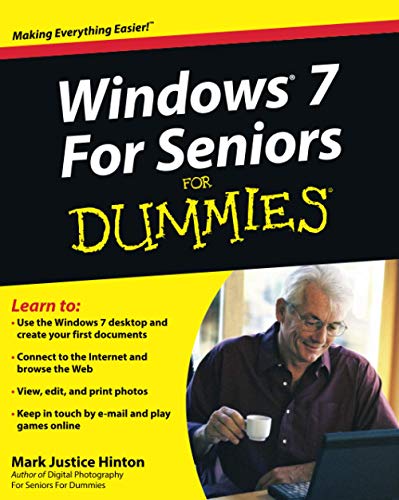
This easy-to-understand guide helps seniors get started with Windows 7!Many seniors use a home computer to stay connected to family and friends. This fun and friendly guide shows how to use Windows 7, the most popular operating system pre-loaded onto personal computers and laptops, to write e-mails, connect with family via Windows Live Messenger, download pictures with Photo Gallery, and listen to music using Windows Media Player.Windows 7 For Seniors For Dummies uses a large font for the text that makes the book easier to read and it features magnified screen shots to help make the subject matter less intimidating. For Dummies author Mark Justice Hinton walks you through the basics of Windows 7, shows you how to customize the desktop so that it accommodates your needs, and explains how to use the webcam and instant messenger to keep in contact with family and friends. Plus, you’ll get critical insight for protecting your personal information.Shows seniors how to stay connected to family and friends using the features of Windows 7Explains how to use the Internet, send and receive e-mail, upload and download photos, view video, listen to music, play games, use webcam and instant messenger, and moreDiscusses the important topic of keeping data and personal information safe and secureUses a larger font for text and includes more than 150 enlarged screen shotsFor seniors interested in getting started using the exciting features of Windows 7, Windows 7 For Seniors For Dummies is the ideal beginner guide!
User’s Reviews
Editorial Reviews: From the Inside Flap Learn to:Use the Windows 7 desktop and create your first documentsConnect to the Internet and browse the WebView, edit, and print photosKeep in touch by e-mail and play games onlineYou can learn to use Windows, get online, and start doing things today!You don’t need a grandchild to teach you Windows 7 — with this friendly guide, you’ll be using the mouse, working with folders, hooking up a printer, and cruising the Internet in nothing flat. Learn to use all the gizmos that come with Windows 7, shop online, view a slideshow of your favorite photos, send e-mail to a friend, enjoy music, and more! Tour the desktop — learn to use menus, the Start menu button, files, and foldersDo it — create notes and letters, connect a printer, download photos from your digital camera, and put music on a CDHave some fun — discover Solitaire and other built-in games, listen to music, and watch a movieUse the accessories — display Gadgets on your desktop, draw with Paint, and use the CalculatorTo keep or not — install additional programs you want and remove those you don’t needProtect your Windows — learn to use the Action Center, download and install virus protection software, and keep it up to dateHave it your way — make your screen easier to see, open files with a single click, and even have your computer read to youThe wide, wide Web — shop and explore online and learn to stay safe Open the book and find:What’s on the taskbarDirections for creating and saving documentsSteps for installing a printer and other peripheralsHow to connect to the Internet anywhereBackgammon and other games you can play onlineGuidance on protecting your computer from virusesHow to send e-mail attachmentsAdvice on backing up documents and photos From the Back Cover Learn to:Use the Windows 7 desktop and create your first documentsConnect to the Internet and browse the WebView, edit, and print photosKeep in touch by e-mail and play games onlineYou can learn to use Windows, get online, and start doing things today!You don’t need a grandchild to teach you Windows 7 — with this friendly guide, you’ll be using the mouse, working with folders, hooking up a printer, and cruising the Internet in nothing flat. Learn to use all the gizmos that come with Windows 7, shop online, view a slideshow of your favorite photos, send e-mail to a friend, enjoy music, and more! Tour the desktop — learn to use menus, the Start menu button, files, and foldersDo it — create notes and letters, connect a printer, download photos from your digital camera, and put music on a CDHave some fun — discover Solitaire and other built-in games, listen to music, and watch a movieUse the accessories — display Gadgets on your desktop, draw with Paint, and use the CalculatorTo keep or not — install additional programs you want and remove those you don’t needProtect your Windows — learn to use the Action Center, download and install virus protection software, and keep it up to dateHave it your way — make your screen easier to see, open files with a single click, and even have your computer read to youThe wide, wide Web — shop and explore online and learn to stay safe Open the book and find:What’s on the taskbarDirections for creating and saving documentsSteps for installing a printer and other peripheralsHow to connect to the Internet anywhereBackgammon and other games you can play onlineGuidance on protecting your computer from virusesHow to send e-mail attachmentsAdvice on backing up documents and photos About the Author Mark Justice Hinton teaches all kinds of technology from digital photography to HTML. He maintains a blog at www.mjhinton.com/help where he answers questions from his readers, and he is also the author of Digital Photography For Seniors For Dummies. Read more
Reviews from Amazon users which were colected at the time this book was published on the website:
⭐I’m being dragged kicking and screaming from my aging computer with Windows XP (which apparently is going the way of the dodo next spring), to a new computer with Windows 7 (the fellow building my computer said he’ll spare me from Windows 8, which I haven’t heard anything good about). I learned to use XP by reading Windows XP for Dummies by Andy Rathbone, and it has been my bible. Informative and easy to understand, even for a hardcore non-techie like myself.Since I now have a few years of computer experience and am a senior citizen, I ordered Windows 7 for Seniors Dummies, expecting pretty much the same thing. But I found this book unnecessarily “wordy.” So I don’t know if it’s just that the book is a little too technical for my needs, or I’m a doddering old geezer beyond help.I’ll keep this book around for reference; however, I’m going to go ahead and order Andy Rathbone’s Windows 7 for Dummies; I just find his explanations a lot more user friendly.
⭐I am honestly disappointed in this book. I am 79 years old and NOT that knowledgeable about computers in the first place which puts this book in the sorry disadvantage of being written (FOR ME) as if it were in GREEK. I have had NO past use of most of the words he uses. I thought that since it was for DUMMIES that it would be more in the “SEE JANE RUN” type wording. It certainly is not but that IS what I need and hoped for when I made this purchase. I feel that I truly wasted my money. I can see where it would be of help for someone who has used previous programs or worked in an office. I only needed one to write emails to my many kids, grandkids, and greatgrandkids! To keep track of my medical problems. But Microsoft said that my H/P that was a 2006 model was too old to continue producing software for. Sorry, Amazon, but I cannot write a glowing recommendation for this book. Sincerely, Louise Mustain
⭐The only thing I know about computers are what my kids have taught me over the last 10 yrs, and they hated trying to teach Mom! Now they are all moved out and I’m on my own, as far as keeping up with computers. So I got this book hoping it would help me to learn more of the basics. Which it did a bit, but it just didn’t have enough information in it to really get me much farther than I already was. It was a bit difficult to follow…and it’s for DUMMIES. I had to read it over and over to understand what they were talking about. So…I don’t think it would help Seniors out for beginng to learn about computers enough. If I didn’t already know what I knew…I don’t believe this book would have really helped me much. Would advise getting a more BEGINERS Book for someone who does’nt know anything about computers, all you Seniors out there 🙂
⭐Bought for a friend who is 86 & this is a great gift. Much easier to understand they way they have written it and explained it.She has been reading it everyday. I usually help her with her computer everyday, so I hoping this will help her. She seems to mess something up on her computer everyday and has downloaded all kinds of stuff. The large print is so wonderful because she can read it without using wearing her bifocals. She bought a different book on Amazon and when she got it it was way too technical for her so she gave it to me. I’m a computer geek and I HIGHLY recommend this book! 🙂
⭐I purchased two copies. My Mother recently had gotten her first computer. Unfortunately she lives hundreds of miles away.So, I’d gotten a copy for both of us. That way, I could talk to her on the phone and walk her through so many different issues. It was a real “frustration” stopper! I laugh when I think about it. I only wish I’d though of this prior to her purchasing her computer. Anyone that’s had NO experience with a PC know the frustration it can cause…even turning it on can become a task larger than life. This was a great purchase.
⭐The book explains things step by step, very helpful for seniors that are not pc efficient. I used it alot and was lost before I got the book
⭐Big disappointment. there were 4 things that I could not find in any info that I all ready had. I could not find out what I needed to know in this book. It was written by someone that either could not or was not smart enough to explain things so that people like me can’t understand. I would not recommend this book for anyone. Better to go to a computer fix it shop and ask them for help. Better to pay them and have a good place to get your computer repaired when and if you need it.
⭐I bought this for my dad, an 80-something former engineer. He has a stronger technical background than the average person for whom this book was written, but Parkinson’s Disease has provided mental challenges, and new learning is harder for him than the old stuff that he used 20 years ago.The large print and clear illustrations are great for him and he was delighted to learn how to increase the size of the text on the screen!
⭐This has been the perfect purchase for my 90 year old father-in-law for whom I’ve just bought his first laptop (
⭐Toshiba Satellite C855-11F 15.6 inch Laptop(Intel Pentium B960 2.2GHz, 6GB RAM, 640GB HDD, Windows 7 Home Premium)
⭐. Although keen to learn, having never used a keyboard in his life and having no experience of ‘new technology’, it’s all a different world for him, but this book is a clear and gentle introduction for him.It’s very clearly laid out, written in a very easy to understand style and explains everything – how to click a mouse, what files are, what the taskbar is and does and how to connect to the internet. It really is very simple and assumes absolutely no prior knowledge of computers so is perfect for a complete beginner and nervously apprehensive novice.Having bought and set up laptops for other elderly relatives, I braced myself in anticipation of the phone ringing non-stop with a worried voice panicking at the other end. Instead, to my relief and surprise, his few queries have been sent via email and, largely thanks to this guide, he’s learning quietly at his own pace with the book to guide him through and give him the confidence to enjoy it.I wouldn’t hesitate to recommend this to anyone, young or old, with no computer experience but who wants to learn. It’s also good for anyone with an elderly novice friend/relative and not a lot of time or patience to deal with an endless stream of very basic questions!
⭐I am nearing my latter years now in my 60s, though I would say that I’m not dim, it is nice to use this Windows 7 for seniors without a lot of jargon clouding your mind, I am very pleased with it & find things easier to understand, it’s a great help & thanks for the speedy service.Tony M-S
⭐I have recently changed to Windows 7 and am definitely a Senior. I have not read through the book but have found it useful when having problems in navigating round Windows 7. I have particularly found useful advise on Photography which is one of my main interests. I would certainly describe myself as a ‘Dummy.’
⭐A lot of topics are skimmed over superficially or simply don’t appear even in the index. This leaves readers guessing in what can easily be a catastrophic way. The text is heavily weighted towards “fun stuff” to the detriment of serious virus issues.
⭐Every time I have upgraded my windows operating system have bought one of these books, they are great not just for seniors, my son even borrowed mine, lots of easy to follow instructions and very simple to understand in plain language.
Keywords
Free Download Windows 7 For Seniors For Dummies(r) 1st Edition in PDF format
Windows 7 For Seniors For Dummies(r) 1st Edition PDF Free Download
Download Windows 7 For Seniors For Dummies(r) 1st Edition 2009 PDF Free
Windows 7 For Seniors For Dummies(r) 1st Edition 2009 PDF Free Download
Download Windows 7 For Seniors For Dummies(r) 1st Edition PDF
Free Download Ebook Windows 7 For Seniors For Dummies(r) 1st Edition