Ebook Info
- Published: 2008
- Number of pages: 672 pages
- Format: PDF
- File Size: 29.70 MB
- Authors: Doug Sahlin
Description
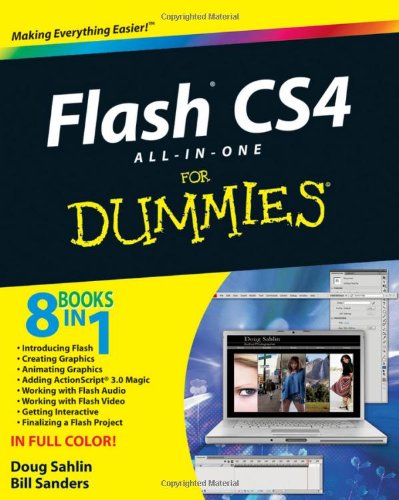
Ready to take your Flash skills to the next level? Learn how to use Adobe Flash CS4 to create innovative interactive experiences! Flash CS4 All-In-One For Dummies shows you how to create professional, cool projects, step by step, from start to finish. Whether you’re working on your first Flash project or you’re a veteran Flash animator ready to get into more advanced applications, Flash CS4 All-In-One For Dummies walks you through Flash’s new tricks and explains how to use them. You’ll get the skinny on new features including inverse kinematics, motion tweening, and Motion Editor. You’ll also find out how to:Work with panelsTake advantage of an ActionScriptCreate and plan your first projectFollow the ins and outs of Flash graphicsNavigate your way around the swatches panelGet your video on the Web using YouTubeUtilize Flash audio and videoDevelop with the Flash timelineTo help you quickly find what you need, Flash CS4 All-In-One For Dummies is divided into eight minibooks:Introducing FlashCreating GraphicsAnimating GraphicsAdding ActionScript 3.0 MagicWorking with Flash AudioWorking with Flash VideoGetting InteractiveFinalizing a Flash ProjectFlash CS4 All-In-One For Dummies will help make your experience animating in Flash much easier!
User’s Reviews
Editorial Reviews: From the Back Cover Learn Flash CS4 from the ground up with this one-stop, nuts-and-bolts reference guide!Take your Flash skills to the next level with this easy-to-use book that explains it all! Whether you’re working on your first Flash project or you’re a veteran Flash animator ready to get into more advanced applications, Flash CS4 All-in-One For Dummies shows you Flash’s new tricks and shows you how to use them — in a flash!Find out what’s new in Flash — get the skinny on new features including inverse kinematics, motion tweening, and Motion EditorDeco tool, Spray Brush, Bone tool, and more! — find out about all the fun new tools Flash has to offer in CS4Your first Flash project made easy — learn how to create professional, cool projects, step by step from start to finishGet ready for prime time — from camera to desktop, get the inside scoop on working with Flash videoGet interactive — everything you need to know to add Flash to create cool interfaces for applications and Web sitesOpen the book and find:Clear explanations of graphics, symbols, and animationsTips for working with panelsWhat ActionScript can do for youHow to create and plan your first projectThe ins and outs of Flash-y graphicsHow to add artistic colors and gradients with the color panelNuts-and-bolts tips for working with Flash audio and videoSteps for working with the Flash Timeline About the Author Doug Sahlin is a professional photographer and Web designer. His authoring credits include Building Web Sites All-in-One Desk Reference For Dummies and Digital Photography Workbook For Dummies. Bill Sanders is a prolific author on Flash and Web technologies and operates his own multimedia consulting business at sandlight.com.
Reviews from Amazon users which were colected at the time this book was published on the website:
⭐Maybe it’s just me but these two “writers” (and I use the term loosely) should have their pencils taken away. Their code examples DON”T WORK! The download files that they say can be downloaded from their “Dummies site” are non existent. Evidently proof reading was too much of an effort. The tiny, tiny fonts used to show their (unworkable)code and high gloss paper make this book almost unreadable. All in all I should have purchased a couple of pizzas with the money I spent on this useless chunk of trash. I guess they really mean it when they say this book is for dummies….I was a real dummy for buying it that’s for sure!!!
⭐While I appreciate the relatively quick pace of “Flash CS4 All in One for Dummies”, I can’t agree with its description as being useful for both those completely new to flash as well as seasoned vets. It seems to fall squarely in the middle of those two groups much of the time, but then careens widely in either direction at the strangest times. The book is broken up into “sub” books, and the authors make it clear that the overall book should be treated as a reference guide and less as a straight read; this alone makes it a pretty tough read for someone completely new to Flash, but it also seems to make the strangest assumptions about what a new user would likely know and then one section later it spends multiple pages on information that isn’t even specific to the Adobe Suite, nevertheless to Flash.Most of the useful “what has changed with Flash” information is hidden throughout the book, so if you’re familiar with a recent version of Flash, this isn’t much of a helpful manual either. I was coming from a professional working knowledge of the rest of the Adobe Suite, but was years out of touch with Flash, so the book’s mostly middle ground approach to CS4 was useful to me. However, I still felt like the presentation order of topics was unhelpful, and trying to read through the book quickly resulted in having to skip pages just as frequently as I had to go back a few pages wondering if I’d missed something.There seemed to be a minimum amount of confusing typos, but honestly, the 3 or 4 I found that actually mixed up labels or broke code are really 3 or 4 too many for a “beginner’s” guide. Also, the default layout and available windows in Flash tended to be different than what the Author’s assumed they would be, so there are a few places of confusion that result from that.All in all I found this book useful for what I needed to do, which was jump a big gap of missing knowledge of Flash, but I’m not sure how many others are looking for this book to do only that.
⭐This is one of the poorest books I’ve ever used; my first and last of any of the dummies series. I have a programmer background but never used flash. Action script is a little strange but no big deal. It would be nice if the examples from their download page actually worked! Book IV chapter 1 “OnStage” “TextMove” as two of many examples: you just down load the examples and hit control + enter and it DOES NOTHNG!I did find the error in another one (a missing semi-colon) but I could only know this from looking at OTHER code examples on the web! It is pretty hard to debug a language you don’t know, I can’t image how anyone with little or no programming background could figure it out.Echo the poor organization from the above critiques and the 2 pages to say virtually nothing on obvious concepts and the poor explanations of the unique or more complex concepts.Oh yea, try to get to the “registration” page where they’d be glad to hear from you or to provide information.Go to the ADOBE web site and use the tutorials. Money well saved!
⭐Hard to follow, for a beginner, information seems out of order at times, a couple of the tutorials have errors in them, and if you are new to Flash it will be frustrating to problem solve the book while trying to learn at the same time. I’d look elsewhere
⭐Certes l’image n’est pas en HD, mais l’ensemble est correct pour le prix. Il faut, en fin de compte, éviter de trop bouger le stylo, voire immobile, tant pour la caméra que pour la prise de son. L’accrocher à sa veste ou le laisser sur une table, donne de bon résultat tant en son qu’en images/film. J’avoue que c’est assez bluffant et suffisant. La notice est en japonais et anglais et je n’ai pas encore compris comment mettre la date à jour mais l’installation se fait rapidement sous Windows7 et les films ou conversations sont stockés sur la clef USB de 4 Go, puisque ce stylo fait aussi clef USB. Transfert facile vers le PC, en direct ou par câble fourni . Attention toutefois à la manipulation…ce stylo est relativement fragile, il ne sert pas a passer ses nerfs. Pensez à le recharger sur une prise USB de PC ou autres…1 heures environ pour 1h30 autonomie approximative.
⭐Not found.
⭐Très bon produit.arrivé à la date donnée.Pour ce petit prix vous avez une bonne qualité d’image (pas de full hd bien sûr..)mais la résolution est correcte.Idéal pour prendre photos et vidéo en toute discrétion.Seul bémol. Pas de notice.
⭐Not found.
⭐Un grand defaut, il ne possède pas de stabilisateur d’images ce qui rend la lecture un peu difficile mais pas sans intérêt.Petite critique le manuel d’explication est en anglais et japonnais, donc dur la traduction pour se sevir des différentes fonctions. Heureusement c’est relativement simple de fonctionnement dans l’ensemble.Gadget super sympa, et amusant pour le prix. Ne merite pas plus que la valeur proposée.
⭐Not found.
⭐article de bonne qualité mais attention FRAGILE! fait de bonnes vidéo c’est amusant et on peut toujours l’avoir sur soi
⭐Not found.
⭐Nul, pas de notice en français, tout juste une feuille de papier, en guise de notice dans un mouchoir de poche, en chinois et anglais : tant pis pour les français. Vu le prix il est très fragile! Cest la seule qui est logique pour cet objet. Impossible de s’en servir pour le moment : avis de recherche lancée pour la notice
⭐Not found.
Keywords
Free Download Flash CS4 All-in-One For Dummies in PDF format
Flash CS4 All-in-One For Dummies PDF Free Download
Download Flash CS4 All-in-One For Dummies 2008 PDF Free
Flash CS4 All-in-One For Dummies 2008 PDF Free Download
Download Flash CS4 All-in-One For Dummies PDF
Free Download Ebook Flash CS4 All-in-One For Dummies