Ebook Info
- Published: 2009
- Number of pages: 384 pages
- Format: PDF
- File Size: 12.50 MB
- Authors: Joel McNamara
Description
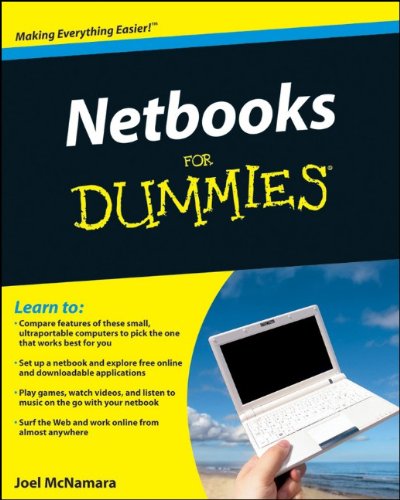
The only full-service reference on choosing, setting up, and using the hot new NetbookNetbooks are the fastest-selling segment of the PC market. These small, lightweight mini-laptops are less expensive and run longer on a battery charge than traditional laptops. This is the first book to cover everything from choosing the right Netbook to adding memory and remote access.You’ll learn to compare various models and identify what best meets your needs, connect to the Internet almost anywhere, choose and use free productivity tools, and much more. Netbooks For Dummies covers both Windows and Linux, since Netbooks are available with either operating system.Explains what Netbooks are, what they can do, and the advantages of mobile technologyProvides criteria to help you decide what you need in a Netbook and descriptions of the available models, so you can choose one which best meets your needsCovers both Windows (including Windows 7) and Linux operating systems available on NetbooksWalks you through setting up a Netbook and shows you how it can work for you both at home and on the goDiscusses free online productivity applications, data synchronization services, and social networksCovers advanced topics like adding memory and remote accessWith Netbooks For Dummies, you’ll be ready to make the most of the hottest mobile computing technology on the market today.
User’s Reviews
Editorial Reviews: From the Back Cover Want to streamline your life with a netbook? Here’s what you need to know!What’s smaller than a laptop, bigger than a cell phone, and keeps you connected? It’s the netbook, and this “real” book tells you how to pick the right one; use it for work, school, and play; and add bells, whistles, and anything else you might need. The book also covers all the operating systems that run on netbooks, including Linux, Google Chrome, Windows XP, Windows Vista, and even Windows 7.Out of the box — set up your netbook, charge the battery, and sync it with your primary computerGet connected — via Wi-Fi, 3G networks, Bluetooth, or EthernetDo some work — explore Microsoft Works, OpenOffice.org, Google Apps, and Zoho productivity suitesPlay time — discover free Internet radio, streaming video, and games you can play on your netbookKeep up with your peeps — tweet and IM, keep up with Facebook friends, and make Skype phone callsEven netbooks like accessories — check out ways to expand storage, protect your netbook with a case, and add a mouseSafety first — find quality antivirus programs, firewalls, and encryption optionsThe maintenance mantra — learn about backing up and restoring your netbook, troubleshooting, and managing battery lifeOpen the book and find:What to compare when choosing a netbookThe different operating systems that run on netbooksThe differences between netbooks and traditional laptopsTips for making batteries last longerThe best accessories for your netbookHow to keep your netbook running smoothly — and quicklyGPS units that work well withyour netbook About the Author Joel McNamara has been a computer aficionado since the dawn of the PC. He has served as a developer, technical writer, and manager in various high-tech companies. The author of GPS For Dummies and Secrets of Computer Espionage: Tactics & Countermeasures, he might be considered a Renaissance geek.
Reviews from Amazon users which were colected at the time this book was published on the website:
⭐This user manual was to be a companion reference for the netbook we gave my 92-year-old parents for Christmas. The idea was to continue their subscription to magazines which had gone all digital and also provide access to good literature via Nook for PC. Runs to brick and mortar sources aren’t as easy as they used to be.I had the manual a very short time before wrapping it and putting it under the tree so I can only offer my first impression. What struck me right away was that this book offered way more information and detail than any dummy (me) needed or could easily process. However, after about 20-minutes of search and practice I did learn to use the touchpad and was able to convey this skill to Mom and Dad. Word from the folks is that they are now surfing, reading from Nook, and taking the netbook to Book Club. But, at this point, we all wonder if anyone out there has published a netbook how-to for subdummies.
⭐It not bad for beginner to computers but notwhat I was looking for. Its a good tool forteaching someone who don’t know anything.
⭐I bought this book BEFORE I bought my netbook and I am so-o-o glad I did! Do yourself a favor before trouble happens. It is a lifesaver!
⭐As a first time netbook purchaser I found this book extremely helpful and continue to refer to it for upgrade information and use it as a reference. Great price from te seller as well.
⭐Couldn’t get this from the local library so I bought this one and it was a good price for a book that was printed in 2010. It provided very good and useful information.
⭐I found the dummies book answers a lot of questions. I am still looking items up.
⭐i can use computer not expertly but can do basic this really didnt help much with my netbook i didnt find it useful and my dad who is completely unknown to netbooks etc found it totally unhelpful it just tells you what to buy,set it up etc igave it to the local charity shop
Keywords
Free Download Netbooks For Dummies 1st Edition in PDF format
Netbooks For Dummies 1st Edition PDF Free Download
Download Netbooks For Dummies 1st Edition 2009 PDF Free
Netbooks For Dummies 1st Edition 2009 PDF Free Download
Download Netbooks For Dummies 1st Edition PDF
Free Download Ebook Netbooks For Dummies 1st Edition